


6 Business Processes that you should automate with Power Automate
- What It Does: Microsoft Power Automate lets organizations build workflows that eliminate repetitive manual tasks across email, approvals, data entry, and reporting without requiring extensive coding.
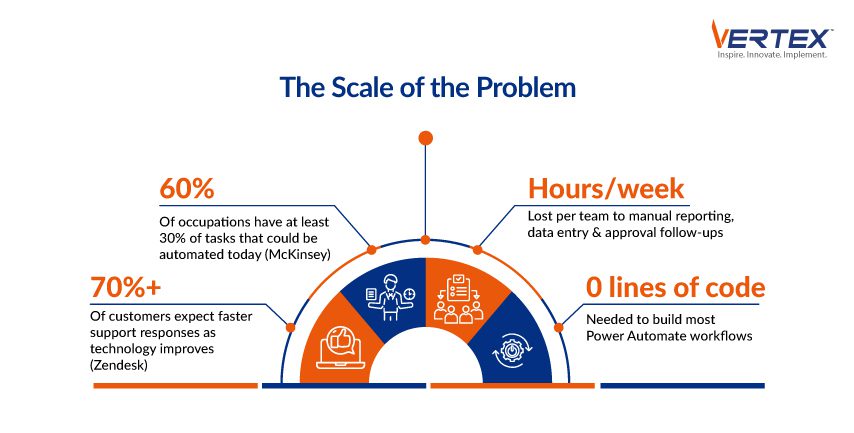
- The Business Case: McKinsey research shows 60% of occupations have at least 30% of activities that can be automated with currently available technology, making the productivity opportunity significant for most organizations.
- 6 Processes to Automate: Employee onboarding, approval workflows, cross-system data synchronization, customer support ticket routing, document management, and scheduled reporting are the highest-impact starting points.
- What It Connects To: Power Automate integrates natively with Microsoft 365, SharePoint, Teams, Outlook, Dynamics 365, Salesforce, and hundreds of third-party platforms to synchronize data and trigger actions across systems.
- What Success Requires: Effective automation goes beyond technology; it requires identifying the right workflows, integrating systems properly, and designing strategies that scale as the business grows.
In most organizations today, employees spend a surprising amount of time on repetitive tasks like forwarding emails, updating spreadsheets, routing approvals, or manually moving data between systems.
Individually, these tasks may seem small. But collectively, they consume a significant portion of valuable work hours.
According to a study by McKinsey, about 60% of occupations have at least 30% of activities that could be automated using currently available technology.
This is where automation platforms like Microsoft Power Automate come in.
Power Automate allows businesses to automate repetitive workflows across applications such as Microsoft 365, SharePoint, Teams, Outlook, and many third-party platforms without requiring extensive coding.
Let’s explore six business processes that organizations should strongly consider automating to make your team more productive.
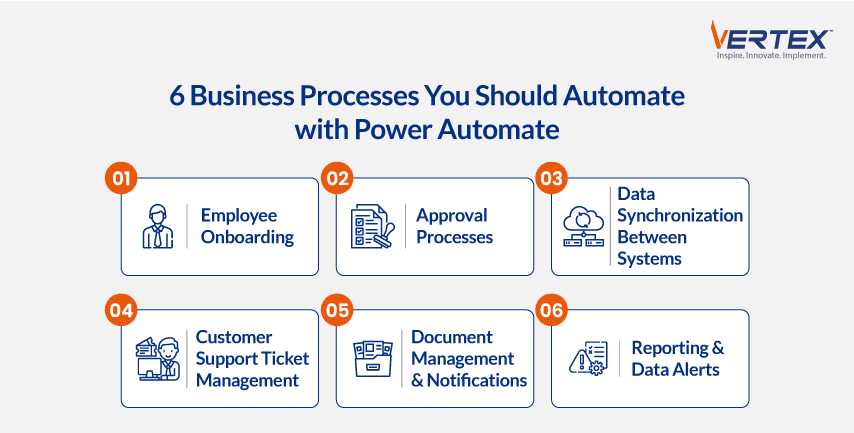
Employee Onboarding Workflows
Employee onboarding typically involves several manual steps:
- Sending welcome emails
- Creating accounts in internal systems
- Assigning training resources
- Notifying HR and IT teams
- Providing access to documents and tools
Without automation, this process can easily become inconsistent or delayed.
With Power Automate, organizations can build workflows that automatically trigger when a new employee record is created.
The system can generate onboarding emails, create tasks for HR and IT, provision system access, and ensure that all required documentation is shared.
The result is a smoother onboarding experience for employees and less administrative work for HR teams.
1. Approval Processes
Approval workflows are among the most common sources of delays inside organizations.
Expense approvals, purchase requests, travel approvals, and document sign-offs often rely on email threads or manual tracking.
Automating approvals through Power Automate ensures requests are routed instantly to the right stakeholders.
Approvers receive notifications in email or Microsoft Teams, and approvals or rejections can be processed in a single click.
2. Data Synchronization Between Systems
Many organizations still rely on manual processes to move data between systems.
For example:
- Sales data from CRM is being entered into spreadsheets
- Customer records copied between applications
- Support tickets manually logged into reporting tools
These manual transfers not only waste time but also increase the risk of errors.
Power Automate can automatically synchronize data between platforms like Salesforce, SharePoint, Dynamics 365, Outlook, and other applications.
When new data is created in one system, it can instantly update records in another.
This ensures consistency while eliminating repetitive manual work.
3. Customer Support Ticket Management
Customer service teams often receive requests through multiple channels, like email, web forms, or chat.
Without automation, support teams may spend significant time sorting, assigning, and tracking requests before they even begin solving the issue.
Power Automate can automatically:
- Capture incoming support emails
- Create tickets in helpdesk systems
- Assign tickets to the appropriate department
- Notify teams via Microsoft Teams or email
According to Zendesk’s Customer Experience Trends Report, over 70% of customers expect faster responses as technology improves.
Automating ticket routing helps support teams respond faster and maintain better service quality.
4. Document Management and Notifications
Organizations handle large volumes of documents every day. Contracts, reports, policies, and invoices have to be managed and sorted daily.
Manually managing these documents often leads to problems such as missed updates, outdated files, or approval delays.
With Power Automate integrated with SharePoint or OneDrive, organizations can create workflows that automatically:
- Notify teams when documents are uploaded or updated
- Trigger approval processes for new files
- Archive documents after a specific time period
- Send reminders for expiring contracts
Automation ensures documents move through the right processes without relying on manual follow-ups.
5. Reporting and Data Alerts
Business leaders depend on regular reports to monitor performance.
But generating these reports manually can consume hours each week.
Power Automate can streamline reporting by automatically pulling data from multiple sources and sending scheduled updates to stakeholders.
For example:
- Weekly sales performance reports emailed to leadership
- Real-time alerts when inventory falls below thresholds
- Notifications when KPIs exceed defined limits
Automated reporting ensures decision-makers always have access to timely information without requiring manual effort.
Automation Is No Longer Optional
As businesses continue to adopt digital tools, the volume of repetitive operational work continues to grow.
Automation platforms like Power Automate allow organizations to streamline processes, reduce manual errors, and free employees to focus on more strategic work.
But successful automation requires more than just technology.
It requires identifying the right workflows, integrating systems effectively, and designing scalable automation strategies.
At Vertex Computer Systems, we help organizations design and implement intelligent automation solutions using the Microsoft ecosystem.
With deep expertise in Microsoft technologies and enterprise workflow optimization, Vertex helps businesses identify high-impact automation opportunities and build scalable workflows using Power Automate, Power Apps, and other Microsoft tools.
Our long track record of successful implementations ensures that automation initiatives deliver measurable improvements in efficiency, productivity, and operational visibility.
Ready to Start Automating?
If your teams are still spending valuable time on repetitive tasks, automation could unlock significant productivity gains.
Connect with Vertex Computer Systems today to explore how Power Automate can help transform your business processes and accelerate your digital transformation journey.
Recent Blogs

3 August, 2026

27 July, 2026

20 July, 2026

13 July, 2026

6 July, 2026

29 June, 2026

22 June, 2026

15 June, 2026
Recent News

26 February, 2026

6 December, 2025

1 August, 2025

2 February, 2025

14 November, 2024

4 November, 2024

1 August, 2024

6 March, 2024