
IDC-Level Automation Tools Enhance Supply Chain & Risk Management

The global economy is barely surviving with the ongoing geopolitical instability and economic uncertainty.

Then there are constantly growing consumer demands for speed and transparency, which have rendered the traditional supply chain mechanism obsolete and a thing of the past.

In today’s world, enterprises are turning to a new class of automation tools, such as the IDC solution, which not only automates tasks but also provides strategic insights.

Vertex’s automation tools are the perfect example: they include bSync, bSure, and bSavvy.

These tools are great when it comes to improving efficiency, minimizing risk, and implementing data-driven automation that can strengthen the supply chain.

This article explores how these advanced tools enhance supply chain and risk management with quantifiable results.

The Imperative for Supply Chain Automation

The need for automation is clear if we look at a report on supply chain resiliency, done by Interos.

The report states that 74% of organizations experienced a major supply chain disruption in the past year, with an average financial impact of $180 million.

The gap is there because the traditional methods are unable to provide real-time visibility, and this hinders the operational part of the supply chain.

It is also seen that companies with an automated supply chain are far better at recovering from disruptions than companies without one.

There is also the benefit of customer satisfaction and personalized care.

This is where tools like Vertex’s bSync, bSure, and bSavvy come into play and offer a superior strategic advantage.

They go above and beyond the simple task automation process and provide a more integrated approach that can help with supply chain management and better risk management.

Infographic showing legacy ERP challenges including high costs, customization issues, manual processes and the need for scalable, secure intelligent ERP systems.

bSync: Achieving Seamless Supply Chain Synchronization

The biggest challenge in the modern supply chain is the inaccuracy of data between the supplier and retailer.

It is often seen that there are different prices regarding pricing, quantity, or product specifications, and this will lead to cost penalties or payment disputes.

Vertex’s bSync directly addresses this by acting as a digital bridge between a supplier’s systems and those of large-box retailers.

Impact of bSync:

  • Reduction in Order Rejections: By ensuring the data integrity before orders are finalized, this tool prevents any issues that may have otherwise led to bad sales numbers.
  • Increased Internal Efficiencies: This helps organisations to improve their internal data synchronization operations, and then data analysts can focus on the strategic insights. This will save them a lot of manhours of just them reconciling the data from different sources.
  • Reduced Supply Chain Penalties: By ensuring that accepted orders meet the retailer’s stringent shipping schedules, bSync helped a supplier completely eliminate fines for shipment delays caused by data discrepancies. This single benefit can save companies hundreds of thousands of dollars annually.

When we prevent any penalties and order rejections automatically, the ROI goes up.

Companies are then able to protect their revenue and work on profitability.

Since the tedious task of data reconciliation is automated, a lot of valuable human resources are allocated to do more productive and strategic work.

bSure: The Proactive Credit Management Solution

There are more than operational failures in the supply chain.

The financial risk also plays a vital role, especially in the credit management division.

Traditional methods of credit assessment are all manual and slow.

Since they are manual, there are possibilities of human error, often resulting in red flags or even worse, a delay in payments.

bSure makes sure that the entire workflow is proactive, automated, and depends on data.

Key Benefits of bSure:

  • Streamlined Credit Review: With bSure, you can automate the entire process of a credit review, which will allow the business to make near-real-time decisions. The automation part helps in quickly deciding the creditworthiness of the customer and also reduces the processing time and accelerates the sales cycle with better cash flow overall.
  • Enhanced Visibility and Reporting: This particular tool also gives a real-time window into customers’ account status and credit history through advanced analytics and dashboards. Since we can use a window, the process becomes much faster, and there are no risky accounts. According to a FlowFarma report, automated systems can reduce the time spent on manual risk assessments by up to 75%.
  • Improved Collaboration: A centralized, automated platform provides greater opportunities for sales, finance, and credit teams. Also, all stakeholders have access to the same information, can see the insights, and can provide their own feedback.

bSavvy: The Strategic Mind of Supply Chain Management

While bSync and bSure are meant to tackle operational and financial risks, bSavvy works at a higher and more strategic level.

bSavvy is majorly focused on solving the identity and governance risk in complex SaaS and multi-cloud environments.

A modern supply chain contains a network of interconnected systems and SaaS applications along with trading partners.

Whenever there is a new connection between the supplier and a third-party logistics provider, there is a potential security and compliance risk.

bSavvy is responsible for managing and mitigating these risks by ensuring proper governance and control over any and all digital identities and policies.

Infographic showing future ERP benefits with Vertex including agile systems, predictive intelligence, automated compliance and faster business growth.

The Strategic Value of bSavvy:

  • Compliance and Governance: Since supply chains are becoming more digital, they must comply with a number of regulations, such as GDPR and SOC 2. bSavvy helps the organization maintain just this by providing visibility into its SaaS environment. Furthermore, it also automates policy enforcement and maintains detailed audit trails.
  • Mitigating Identity Risks: This particular tool sniffs out all the dormant accounts, unmonitored access, and weak credentials. Any or all the things that can pose a threat to the supply chain security.
  • Continuous Monitoring: Ditching the traditional methods, bSavvy chooses real-time monitoring through which the organisation can identify and address potential compliance gaps. This extra effort is crucial to staying essential in the fast-paced digital supply chain.

Gartner stated in their 2024 report that organisations with GRC (governance, risk, and compliance) tools experience 30% faster response times to security incidents and a 40% reduction in the total cost of ownership for their security and compliance programs.

bSavvy’s capabilities align directly with these findings, making it a critical component of a resilient supply chain strategy.

Conclusion

Vertex’s IDC level tools, bSync, bSavvy, and bSure, are a blessing for the supply chain and risk management.

We have discussed the importance and benefits of each of these tools at length.

They are assets that not only improve overall efficiency but also give the organisation a strategic edge.

By managing data and automating credit assessment, along with continuous risk governance, these tools can make any business proactive and profitable.

So head over to VertexCs now and speak to an expert to get your own tools.

Real-World ROI of Power Automate and RPA in Enterprise Workflows

The digital landscape is driven by technologies like Robotic Process Automation (RPA).

Technologies like this and their integrated parts, such as Microsoft Power Automate, are redefining the manufacturing landscape.

These are expected to be a profitable way of replacing human task forces in repetitive tasks.

However, their potential extends far beyond that.

The true value of these technologies lies in delivering a quantifiable ROI, enhancing productivity, and enabling the reallocation of funds saved once they are deployed.

In this article, we will talk about the real-world ROI that comes with these automation tools and also look at the supporting data.

Infographic showing automation ROI including reduced legacy system costs, employee time savings, Power Apps benefits and overall 248% ROI.

Quantifying the Financial Impact

The financial gains that we accumulate from the adoption of Power Automate and RPA are not only cost-saving.

It also includes a rise in the overall improved efficiency, along with indirect gains that are then used for further development of the business.

The evidence from studies and implementation stories supports this claim.

A study conducted by Forrester Consulting, commissioned by Microsoft, provides a comprehensive look at Power Automate’s ROI.

The study, which analyzed a composite organization’s experience over three years, found a 248% ROI with a payback period of under six months.

The net present value (NPV) was estimated at a staggering $39.85 million.

The return was allocated to different key areas, such as:

  • Reduction in Legacy System Costs: The organisation retired its old legacy automated tools all altogether and adopted the automation process into a single platform. This saved the organisation an estimated $9.5 million and more in efficiency.
  • End-User Time Savings: The employees who were part of the high-impact RPA cases, which include data entry and invoice processing, saw a gain in efficiency of 200 hours. This alone saved the organization $13.2 million over the three-year period.
  • Extended Automation Benefits: When Power Automate was used in conjunction with other tools such as Power Apps, the time savings increased. The organisation also saved an estimated $31.3 million by saving 250 hours per year.

According to research done by the Grand View Research, the global RPA market is projected to rise from $3.79 billion in 2024 to $30.85 billion by 2030.

The CAGR in this case is seen to be at 43.9%.

This shows how companies have recognized the RPA’s financial viability.

A survey by SMA Technologies further highlighted this, with 52% of financial services organizations reporting annual savings of at least $100,000 through automation.

Infographic comparing Power Automate vs legacy RPA on licensing, infrastructure, development and maintenance with cited industry studies.

Cost-Benefit Analysis: The Full Picture

Calculating ROI goes beyond just time savings. It requires a thorough analysis of implementation costs, including licensing, development, and maintenance.

Licensing and Infrastructure:

One of the most significant advantages of Power Automate, especially compared to legacy RPA platforms, is its transparent, competitive pricing model.

A 2023 blog post by Blueprint Systems, citing a Forrester study, found that Power Automate can deliver a 40-90% reduction in licensing costs compared to other major RPA tools.

Furthermore, it can reduce infrastructure costs by up to 20% by leveraging existing Microsoft investments in Azure and other products.

For example, a single premium user license for a simple flow might be a modest annual cost, but automating a manual task costing a company thousands of pounds annually in labor quickly makes the investment worthwhile.

Development and Maintenance:

Power Automate’s low-code/no-code interface significantly lowers the barrier to entry, enabling “citizen developers” to create automations.

This accelerates development and reduces reliance on expensive, highly skilled technical staff.

A 2024 study noted that improved software developer efficiency due to Power Automate’s integration capabilities led to $2.0 million in time savings for a composite organization.

Strategic and Operational Benefits Beyond the Numbers

The financial metrics are important, but we cannot ignore the strategic benefits associated with RPA and Power Automate.

Improved Accuracy and Compliance:

The RPA bots are very accurate; their consistency rate is off the charts, and this eliminates almost any human error there is.

According to a study conducted by Flobotics, 92% businesses reported improved compliance with RPA.

This is very regulated in industries such as finance and healthcare.

Consider PZU, which used RPA to achieve 100% accuracy in data entry.

All the while decreasing the erosion by 15%.

Enhanced Employee Satisfaction and Productivity:

Offloading repetitive and monotonous tasks using RPA gives employees much-needed space to innovate and rethink their abilities.

This results in a higher value and a strategic approach.

The best aspect to consider is the increase in job satisfaction.

A report by Flobotics found that 89% of employees are more satisfied with their jobs due to automation, and 86% of companies experienced increased productivity.

Encova automated their policy intake process, and this resulted in less manual data entry.

The number dropped from 650 hours per month to 12.5 hours per year with an increased productivity rate of 99%.

Scalability and Agility:

Automation by default supports scalability, meaning increased workloads without hiring any additional staff.

This allows the organisation to react better to market changes.

Consider Habib Bank Limited (HBL), which automated its sanction screening process with 15 digital workers.

They handle 80,000 cases with 98% accuracy.

Infographic showing industry automation results including $120M savings in finance, healthcare migration savings, faster manufacturing processing and retail labor savings.

Real-World Success Stories

The impact of RPA and Power Automate can be witnessed in different industries and in different departments of these industries.

Some of them are mentioned below:

  • Finance: A Forrester study reported that a financial services firm saw $120 million in savings from automated operations. The payment processing for the CHAPS bank was reduced from 10 minutes to 20 seconds.
  • Healthcare: AccentCare, a healthcare provider, saved $100,000 for every 10,000 patient records migrated through RPA.
  • Manufacturing: Thermo Fisher Scientific automated the handling of 53% of its 824,000 annual invoices, reducing data extraction and processing time by 70%. Another manufacturer achieved a 40% reduction in total operating costs by automating over 20 business processes.
  • Retail: Foodstuffs, a New Zealand grocery distributor, implemented an RPA solution across 200 stores, saving 9,000 hours of manual tasks.

Conclusion

If we only consider data, even then the results are overwhelming and in conjecture with this article that the ROI of Power Automate and RPA is not just theory but a proven fact.

The outcomes that we have witnessed in all the studies have made it clear that the gains are not just unidirectional.

The benefits are much more than we originally believed to know; the scalability that RPA offers is too good to overlook.

The Automation process takes away a lot of human error, all the while increasing productivity and efficiency.

This allows the organisation to invest and allocate resources according to market shifts and company needs.

At Vertex, we specialize in designing and implementing automation solutions tailored to your unique workflows, helping you maximize returns and scale with confidence.

Don’t just read about success stories; be the next one. Connect with Vertex CS today and start unlocking your automation potential.

The DevOps Evolution: Platform Engineering and Its Role in 2025

Software development and operations are constantly changing landscapes, driven by the pursuit of efficiency and speed.

In the last decade, DevOps has been the centre of a transformative movement.

In this, they have broken down walls between development and operations and were able to foster collaboration that can automate the software delivery cycle, a feat of its own.

However, that is not enough in today’s time.

Organisations are navigating a much complex cloud-native structure and microservices, and they demand better developer productivity.

This births a new paradigm that is now taking on the space known as Platform Engineering.

Platform Engineering is the next step in DevOps as it offers a structural approach to the underlying complexities of today’s modern software delivery.

This is far from just being a buzzword.

In this article, we will look into the evolution from DevOps to Platform Engineering and will understand what role Platform Engineering plays in today’s organizations and their dynamic field.

Infographic on platform engineering: self-service portals, curated toolchains, automated infra, developer centric design.

The Evolution from DevOps to Platform Engineering

DepOps core unifies development and operations for faster and more reliable software releases.

Cultural integration and continuous delivery, being the two pillars of DevOps, have been able to provide significant improvements in the past decade.

However, the modern world is moving too fast for DevOps to catch up.

Complex modern IT environments demand more than DevOps can handle; for example, implementing and scaling DevOps across a large, diverse team is challenging because we can now expect every developer to possess deep expertise, and the infrastructure becomes unrealistic, which results in delays and certain bottlenecks. 

Platform Engineering is the answer to all the scalability challenges, as it is built upon the core principles of DevOps but with its own layer of abstraction and standardization.

The major difference between DevOps and Platform Engineering is that in Platform Engineering, we do not focus on individual teams and their sets of tools or infrastructure.

Instead, we focus on building self-service capabilities, curated toolchains, and automated infrastructure that simplify the underlying complexity for developers.

In simpler ways, Platform Engineering aims to treat internal developers as customers and to productize the infrastructure and operational tooling.

With this shift, development teams can focus on building a business without worrying about the issues of infrastructure management.

The change from DevOps to Platform engineering is crucial for a well-established, structured, scalable, and developer-centric approach to software delivery.

Infographic on trends: IDPs, AI & Automation, GreenOps, Enhanced DevEx, Built-in Security with DevSecOps.

Key Trends Driving the Evolution

The trends that are fueling the Evolution of DevOps to Platform Engineering are mentioned below.

Infrastructure complexities and Cloud-Native Structures: 

The frequent adoption of cloud-native technologies, such as Docker and orchestration platforms like Kubernetes, along with microservices, has made working with these technologies complex.

Managing these distributed environments and then delivering the desired results requires specialized skills and tools.

Platform Engineering has the required means through which we can overcome these complexities and help developers by offering them a simplified interface to work and interact with such powerful technologies. 

The Need for Enhanced Developer Experience (DevEx): 

In today’s time, retaining a talented developer is crucial; a poor developer can bring in a lot of friction and will cause an overload of work, resulting in decreased productivity and dissatisfaction from the stakeholders.

Platform Engineering directly addresses this by providing self-service tools and automated workflows, along with improving DevEx. 

DevOps Practices: 

When an organisation grows, they have to revisit the implementation of DevOps through the new teams, and this poses a challenge.

However, this is not the case with Platform Engineering; you get a centralized approach with Platform Engineering, and it ensures consistency and best practices for each and every organization.  

Enhancing (DevSecOps): 

We have to periodically enhance the security of software during its development cycle.

Platform Engineering plays a vital role in implementing security controls in the infrastructure and platforms, ensuring that the development cycle remains unharmed. 

Everything (IDPs): 

IDPs, or Internal Developer Platform, is a core component of Platform Engineering.

They are used to provide a self-service portal for the developers so that they can use the necessary infrastructure tools.

This reduces the reliance on the operations team for routine tasks, speeds up development cycles, and promises a better developer anatomy. 

Artificial Intelligence (AI) and Automation: 

Incorporating AI into platforms can automate many tasks, such as infrastructure provisioning, resource allocation, anomaly detection, and incident response.

This will further increase efficiency and reduce manual effort for platform teams. 

Infrastructure as Code and GitOps: 

Managing code through GitOps provides transparency, control of versions, and automation.

These are helpful in creating a reliable platform with fewer vulnerabilities. 

The Role of Platform Engineering in 2025

Platform Engineering in 2025 is going to play a vital role in the development of several industries and organizations, and we have listed some of them for you below:

Simplifying Complexity: 

Developers face a major obstacle in the complexity of cloud-native environments.

Overcoming this hurdle is crucial for better efficiency.

Now, Platform Engineering does this by providing developers with a friendly and consistent experience.

This enables them to focus on writing code and delivering features without ever needing deep infrastructure expertise. 

Enhancing Developer Productivity: 

Platform Engineering offers self-service capabilities, along with automated workflows and curated toolchains.

This lightens the developers’ workloads and makes them more efficient and productive. 

Improving Operational Efficiency: 

If there are repetitive tasks, Platform Engineering will automate them.

This is simple math, and it saves us resources and time and ensures the reliability and scalability of the underlying infrastructure.

This leads to improved operational efficiency.

Strengthening Security and Compliance: 

Platform Engineering can help organisations effectively when they have already embedded security controls and compliance policies into their platform.

This will make the onboarding of DevSecOps practices smoother and with fewer vulnerabilities, ensuring compliance with regulatory requirements. 

Enabling Faster Time-to-Market: 

After Platform Engineering, the self-service nature of the internal developer and the automation provided help smooth the process of software delivery, enabling organisations to respond more quickly to market demands. 

Fostering Collaboration: 

Platform Engineering provides a centralized foundation that fosters collaboration between the development and operations teams.

Thus, it provides a common platform and shared understanding of the infrastructure. 

Optimizing Costs: 

Platform Engineering promotes infrastructure management and resource utilization to the full extent.

This helps in optimizing the cloud and infrastructure costs for the organisation. 

Platform Engineering Best Practices

Organisations should comply with these best practices to implement and benefit from Platform Engineering. 

  • Treat the Platform as a Product: The best practice any organisation can adopt is to treat its internal developers as customers. It should listen to and understand their needs and gather as much feedback as it can. Then, based on the feedback, it should define a clear plan of action that will help the developers reach their goal. 
  • Focus on Developer Experience: They should prioritize the developer and the experience and ensure self-service portals, clear documentation, and optimized workflows. This will help minimize the load and maximize the developer’s satisfaction. 
  • Build Self-Service Capabilities: If the developers are provided with self-service tools and infrastructure, then they will not have to rely on the operations teams, and this will accelerate workflows. 
  • Automate Everything Possible: Try automating all the repetitive tasks, infrastructure provisioning, deployments, and security checks. Automation is the answer for improving efficiency and reliability. 

The Future of DevOps and Platform Engineering

If we are to see and talk about the future of DevOps Platform Engineering, then it can be defined by the trends and key aspects mentioned below. 

Increased Adoption of AI and Autonomous Systems: 

AI incorporation will be over 50%, and there will be automated platform operations, predicting potential issues and optimizing resource utilization.

These systems will be self-enabled and become more prevalent with time.

IDPs will become more intelligent, offering personalized recommendations based on developers’ usage patterns. 

Greater Focus on Sustainability (GreenOps): 

Sustainable practices in platform engineering will include optimizing resources to the full extent and eliminating the infrastructure’s carbon footprint. 

Enhanced Security and Compliance Automation: 

Security will be a major concern, and to overcome this concern, AI-powered tools will be available that can detect any possible vulnerability and enforce policy and compliance management. 

The future of DevOps is intertwined with the evolution of Platform Engineering, as Platform Engineering provides a framework through which you can achieve your goal of DevOps scaling in environments.

Many say DevOps is being replaced by Platform Engineering.

Well, in my opinion, it is like phasing into an evolved stage of DevOps.

This stage is more focused on building a robust, scalable, and developed platform. 

Conclusion

2025 is the year in which Platform Engineering will come on top as the next step in the evolution of DevOps.

The structures and self-service platforms that reduce the complexities of the modern infrastructure empower developers, enhance their operational efficiency, and speed up software delivery. 

The future is AI, and its incorporation in IDPs will result in a better path for automation in Platform Engineering.

Platform Engineering is paving the path for better, more secure, and developer-friendly software delivery in the coming year.

Streamlining Business Processes: How to Integrate Power Automate with Your Existing Systems

Organizations now require smarter methods to lead the competition rather than traditional approaches of working harder.

Every business organization pursues methods to eliminate physical work while enhancing precision levels and production rates. Organizations like yours complete many similar businesses across the world.

Gartner estimates that 30% of organizations will deploy automation solutions in their business processes to achieve operational improvement by 2026.

The tool that leads this transformation is Microsoft Power Automate.

This blog will provide an approach to using Power Automate integration with existing systems, which transforms workflow execution through hands-on demonstrations and practical implementations.

What Is Power Automate?

Power Automate works as a digital assistant that automates different tasks for you.

The no-code/low-code Microsoft platform enables different apps and services to generate automated workflows.

The workflows powered by Power Automate execute recurring operations as well as data synchronization and instant alert notifications without requiring continuous human supervision.

And the best part? You do not require technical expertise to use Power Automate.

Microsoft’s Power Automate enables all users to create workflow implementations through its easy-to-use visual mapping system.

But why should you care about integrating it into your current systems?

Let’s dive in.

Why Integrate Power Automate with Your Business Systems?

Automation represents more than a hot trend because it has become essential for every organization to succeed in this modern business environment.

By integrating Power Automate, your organization will obtain the following advantages:

So, how do you get started?

Your first step requires evaluating locations where automation will generate the most improvement.

Where Should You Start? Assessing Your Automation Needs

Your first step should be to determine which areas would benefit most from automation.

Follow these procedures to start your work:

  1. Note down your process flow to find problems in your work.
  2. Seek tasks that repeat often with high error and slowdown rates.
  3. Establish your targets by stating what you want to achieve, which includes speeding up processing, decreasing errors, and enhancing customer feedback.

Once you know what to automate, it’s time to plan your integration strategy.

Planning a Successful Power Automate Integration

A basic preparation stage helps achieve better results.

These steps will help you achieve a successful Power Automate implementation:

  • Engage Stakeholders: Ask All Staff Members to Offer Their Employees’ Requirements and Create Support Amongst Teams
  • Allocate Resources: Determine how much time, money, and employees are needed to connect technologies successfully.
  • Identify Risks: Find upcoming challenges and develop solutions to deal with system compatibility issues beforehand.

Now that you’re equipped with a plan, let’s explore how to implement Power Automate step by step.


Infographic on integrating Power Automate: identify areas, plan resources, start small, customize, ensure security, track & optimize.

How to Integrate Power Automate with Your Systems

  1. Start Small: Begin with a pilot project. The simplest process to automate provides the best data to measure success.
  2. Use Templates: Microsoft provides numerous predefined templates in its library for you to start working with right away.
  3. Customize Your Workflows: Use conditional logic to direct processes and add approval rules to match your business operations.
  4. Prioritize Security: Secure all data by giving authorized employees access and by regularly checking system activity.
  5. Monitor and Optimize: Review operations regularly while looking at results to update your automation system.

Measuring the Success of Your Automation Efforts

Checking if your Power Automate integration operates correctly requires what actions?

Watch the following metrics to measure success:

  • Process Completion Time: How much faster are tasks completed? The automation system saves us time when tasks are completed.
  • Error Rates: Are you seeing fewer mistakes and inconsistencies? Your system produces fewer errors now than before the integration.
  • Employee Productivity: Are employees spending more time on strategic tasks? Members of staff focus more on leadership activities rather than daily operations.
  • Cost Savings: What operational expenses have decreased since implementing automation? Report all operational expenses that were reduced when you added automation features.

Tracking these metrics helps you fine-tune your automation strategy for maximum impact.

Addressing Common Integration Challenges

Like any major change, integrating Power Automate comes with its share of hurdles.

Here are some common challenges:

  • Data Complexity: Handling different types of data calls for special attention. You can make data movement smooth by connecting Power Automate to external systems.
  • User Adoption: Employees may refuse to accept new business system requirements. Provide personal training and show staff what Power Automate brings them.
  • System Compatibility: Your existing business systems could hinder automated workflows due to incompatibility concerns. Develop a connector platform to connect different systems.
  •  Security Concerns: When automating processes, security issues arise that threaten personal data integrity. A secure system environment needs proper access restrictions plus regular monitoring of workflow activities.


Infographic: Global automation market $26.8B growing fast, reduces errors, future-proofs with scalable automation.

Why Now Is the Time to Embrace Automation

AI and automated software solutions hit USD 26.8 billion in global markets, according to a report.

So, yes, it is going to spread, and when you start using Power Automate today, you will surely receive these benefits first:

  • Prove your business ahead of others while disabling mistakes within your workflow.
  • Deliver strong and unique customer experiences by responding faster to their needs.
  • Make your business adaptable by adding automation tools that can expand as your operations grow.

Wrapping Up

Using Power Automate as a company represents more than a wise decision because it serves as an essential strategy to maintain competitiveness within digital environments.

You can have advanced levels of operational efficiency and innovation.

Learn how VertexCS will direct your automation path and assist in business process optimization for current needs.

Enterprise IT Transformation with Microsoft

Application Integration for Digital Transformation

Application Integration is the process of enabling different digital applications – each developed for a specific purpose – to work with each other. When configured properly, integration allows distinct systems to seamlessly communicate.

In today’s world, Enterprise IT Transformation invariably includes leveraging the Cloud.  As organizations re-engineer their business processes, leveraging On-Premise systems and investments that are already in place and integrating them with new cloud-based solutions is key to cost-effectively stand up new capabilities and services.

Cloud-based app integration is pivotal in business process augmentation, involving various tools and technologies. With clear planning, app integration can reduce IT silos and improve connectivity to integrate applications that unify management, ease access, and limit manual intervention by utilizing various ready-to-plug-in Microsoft Azure Cloud tools and services.

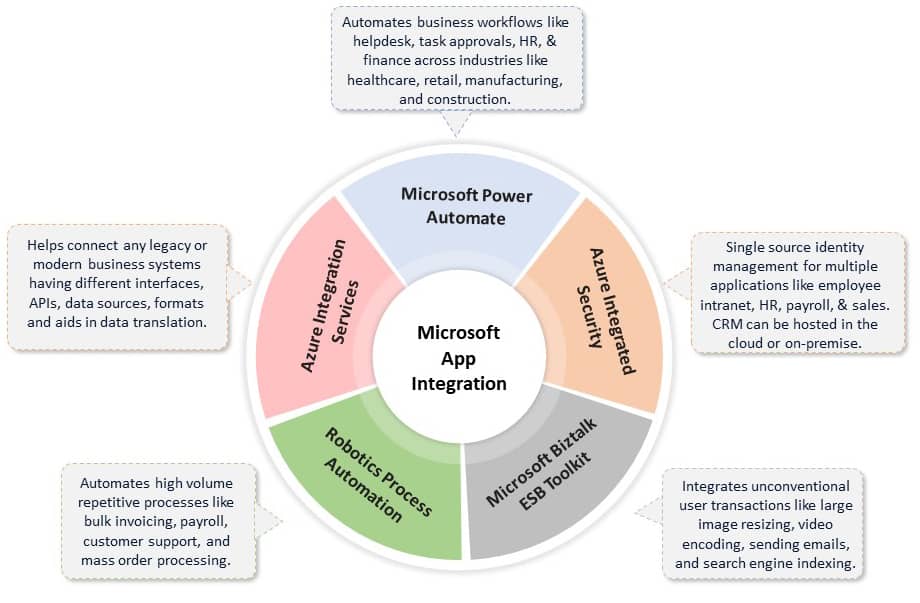
Microsoft offers several App Integration options to build solutions that connect applications and services on-premises and in the cloud.

  • Azure Integration Services enable scalable systems that can orchestrate business processes to connect On-Premise and cloud services using Service Bus, Logic Apps, API Management, and Event Grid.
  • Power Automate (earlier MS Flow) is a service-level offering that can be used to build codeless workflows to integrate business processes using hundreds of inbuilt connectors with disparate M365-based or marketplace applications.
  • Robotics Process Automation through the Power Automate platform using UI Flows builds end-to-end business process automation solutions. Coupled with AI-enabled Power Virtual Agents, it lets domain experts in your company create bots with a guided, no-code graphical interface to automate repetitive and manual efforts to improve productivity.
  • Azure Integrated Security powered by Azure Active Directory and Microsoft Graph allows seamless security integration among users in an organization and all tools and services hosted in Cloud or On-Premise. Features likes Azure B2B and Azure B2C helps extend application access capabilities and controlled permission management to vendors and partners outside the organization.
  • Microsoft BizTalk ESB Toolkit provides the capabilities to build message-based enterprise applications using a collection of tools and libraries that extend BizTalk Server’s capabilities of supporting dynamic messaging architecture to enable rapid mediation between services and their consumers.

App Integration Use Cases
Vertex App Integration

Why Vertex?

As a Gold Certified Microsoft Application Integration Partner, we have certified resources ready to go on all these empowering technologies. Vertex can help you evaluate your integration landscape and cloud integration strategy and build a migration path. Microsoft has recognized our expertise in the areas of Application Integration and Enterprise Business Process Automation.


Using Salesforce to Drive your Manufacturing Growth

You may already think of Salesforce as a powerful Customer Relationship Manager (CRM) application, but it can also help manufacturers to identify, prospect and track opportunities, customers, and cases to drive revenue and growth opportunities. Manufacturers who take advantage of the full breadth of Salesforce’s functionality realize improved revenues and growth margins – all while lowering their SG&A and Operations Costs.

How Can You Improve Your Revenue?

Vertex Computer Systems has helped manufacturers conduct B2B marketing campaigns that expand their ability to understand and respect their customers and ultimately contribute to the continued success of those valued partners. Similarly, Salesforce Sales Cloud can be utilized to attract and engage new customers before, during, and after the sale. If you’re serious about keeping track of your customers at every stage, Vertex has the Salesforce expertise to help you leverage customer relationships to grow sales and improve customer satisfaction.

Because Salesforce provides a true 360° view of the customer, manufacturers can get a clearer understanding of customer needs as well as their journeys through the sales process. Would you like to shorten the cycle from prospect to sale? Salesforce provides standard and custom pricing solution options to help manufacturers accelerate deals. The Partner Portal’s Community Cloud can also enhance collaboration with a manufacturer’s business partners for greater efficiency.

Key Salesforce Features That Help Manufacturers Grow Sales Revenue

  • B2B marketing campaigns
  • Lead scoring and automated assignments
  • Lead-to-Cash process optimization
  • Custom pricing solutions to accelerate deals and maximize gross margins
  • Partner Portal access via Partner Community for maximum collaboration
  • Streamlined/automated customer service experience
  • True 360° view of the customer providing revenues, returns, support costs, etc.

The other side of the profitability equation involves the standardization, optimization, and automation of processes. If you’re interested in lowering your SG&A and operations costs, Salesforce can help. Did you know you can eliminate manual spreadsheets, replacing them with real-time processing, reporting, and alerts? Salesforce provides your Manufacturing team instant access to the same up-to-date detailed information. That’s just one way of many that Salesforce enhances operations.

Key Salesforce Features That lower SG&A and Operations Costs

  • Eliminating manual spreadsheets with real-time processing, reporting, and alerts
  • Demand Forecasting – both revenues and units
  • Contract management
  • Simplified order processing/ERP integration
  • MS Outlook/Gmail integration
  • Reduced customer service and support costs
  • Integrated, automated, and streamlined credit checking

If you want to leverage Salesforce to quickly move the needle for your manufacturing firm, give Vertex a call. You won’t be disappointed.

loader
Vertex Computer Systems is Hiring!Join the Team »
+